Motionprint Ergo can export any completed report to PDF or Excel. Use PDF to share a formatted, print-ready report with a client or archive it alongside a project. Use Excel when you need raw assessment data for further analysis, custom processing, or integration into your own reporting workflow.
Overview
Every completed assessment in Motionprint Ergo yields a report that you can save and share. The application supports two export formats, each serving a different purpose in your workflow. The choice between them depends on whether you need a polished, presentation-ready deliverable or structured data for further processing.
Triggering an export

The Export button sits in the tab bar at the top of every completed report, next to the Edit button. Clicking it opens an export dialog where you select the format (PDF or Excel), confirm the filename, and set a save location. The output folder defaults to the folder last used for that specific report and format, so repeat exports always land in the right place. The file is generated once you confirm your selections.
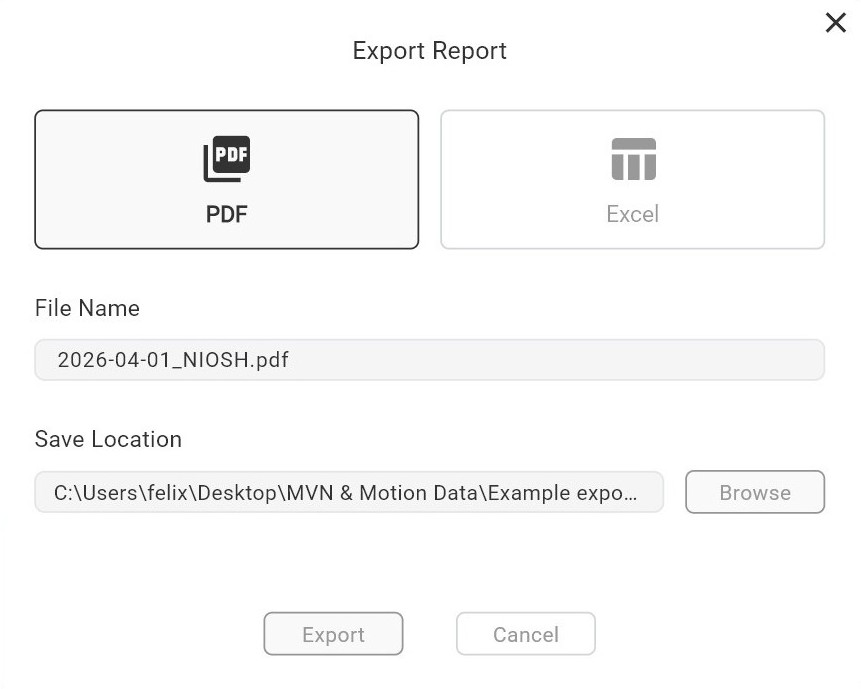
PDF vs Excel — what each format contains
PDF export
The PDF is a formatted, read-only document designed for sharing and archiving. It mirrors the on-screen report layout exactly — including the score overview, analysis charts and visualisations, and the findings section (if enabled). The layout is optimised for A4/Letter printing and suited for client deliverables, compliance documentation, or project records.
Excel export
The Excel file contains the structured data behind the report, suited for further analysis and processing. It includes summary information, all input values, calculated scores, and frame-level data in tabular form — ready to filter, compare across sessions, or feed into your own reporting tools. The layout is also optimised for A4 printing, so you can produce a clean physical copy of the raw data when needed.
Filename templates
Each report type has its own configurable filename template, set in that report type's settings page (e.g. NIOSH Report Settings). The template uses placeholder variables that are replaced with actual assessment data at the moment of export.
The PDF and Excel templates are configured independently — you can use a different naming pattern for each format. For example, a descriptive name for PDFs you share externally, and a structured code for Excel files you import into a database.
Default template: {workstation}_{record_date}_{report_type}
The file extension (.pdf or .xlsx) is appended automatically — do not include it in the template.
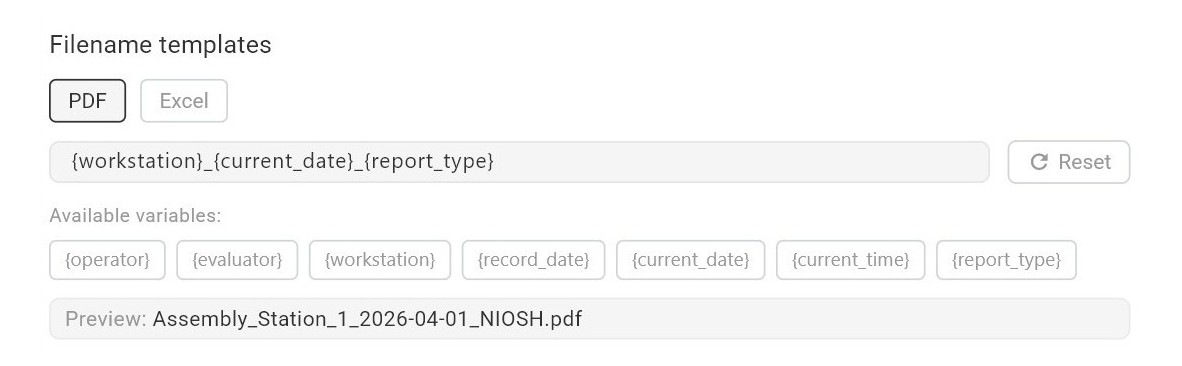
Available variables
| Variable | Replaced with | Example value |
|---|---|---|
| {operator} | Name of the worker being assessed | John Smith |
| {evaluator} | Name of the assessor | Jane Doe |
| {workstation} | Name or description of the workstation | Assembly Station 3 |
| {record_date} | Date of the motion capture recording (YYYY-MM-DD) | 2026-03-15 |
| {current_date} | Today's date at the moment of export (YYYY-MM-DD) | 2026-03-29 |
| {current_time} | Current time at the moment of export (HH:MM:SS) | 14:32:45 |
| {report_type} | Report type identifier | NIOSH |
Example templates
- {operator}_{workstation}_{record_date} — groups files by worker, task, and date.
- {evaluator}_{current_date}_{workstation} — organises by assessor and workstation.
- {workstation}_{record_date}_{current_time} — adds a timestamp to prevent overwrites.
Tips
- Keep templates short and meaningful — long filenames can be truncated on some systems.
- Use {record_date} rather than {current_date} if you want the filename to reflect when the assessment took place, not when you exported it.
- If you export the same report multiple times, add {current_time} to avoid overwriting previous exports.
The variables {workstation}, {operator}, and {evaluator} depend on data entered on the input or results page. If any of these fields are left empty in the assessment, the corresponding variable will be omitted from the filename entirely — it will not appear as a blank or placeholder. Prefer {record_date} or {report_type} for a reliable base when these fields may not always be filled in.