Motionprint Ergo records several fields during an assessment — subject information such as operator name, gender, body height, age, and weight, as well as the evaluator name of the person conducting the session. Privacy settings let you control which of these appear in visual outputs and exports. This article explains exactly what each toggle controls, which fields influence calculations, and which are stored purely for future use. For context on how subject data is saved and managed in the database, see Projects Database.
1 Why these settings exist
Assessments often involve identifiable subject information — the name of the operator being assessed, the evaluator conducting the session, and physical characteristics of the operator. Depending on your organisation's data policies, team structure, or client requirements, you may want to exclude some or all of this information from exports and reports.
The privacy toggles are found in Sidebar → Settings → General, in the Privacy section. They apply to every report type, and to live recording as well: the subject details you enter for a recording session, and the metadata shown in the Recordings Database and the recording viewer, follow the same toggles.
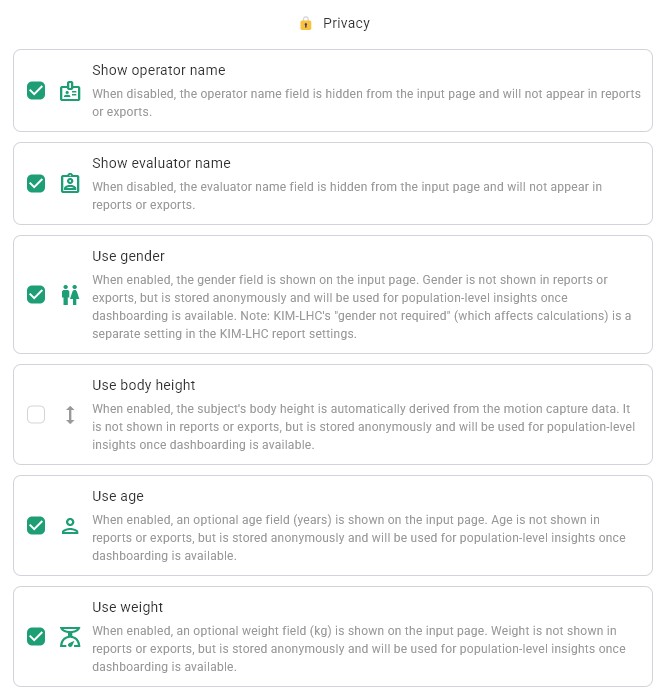
Privacy settings give you control over visibility without affecting the integrity of the ergonomic analysis. The key distinction throughout this article is between fields that are display-only (they appear in outputs but have no bearing on calculations) and fields that have a calculation role (where the setting can affect results).
| Field | Role | Affects calculations? |
|---|---|---|
| Operator name | Shown in reports | No |
| Evaluator name | Shown in reports | No |
| Gender | Stored for future use Calculation (KIM-LHC) | Only in KIM-LHC, via a separate control |
| Body height | Stored for future use | No |
| Age | Stored for future use | No |
| Weight | Stored for future use | No |
2 Visualization-only fields
Operator name
The operator name identifies the person performing the physical task being assessed. When visible, it appears in report headers, the detail panel in the database, and exported files. Toggling it off removes it from all visual outputs and exports.
The toggle is labelled Show operator name. Operator name does not influence any risk calculation — hiding it has no effect on NIOSH Lifting Index scores, KIM-LHC risk totals, RULA scores, or any other computed value. It is a label, not an analytical input.
Evaluator name
The toggle is labelled Show evaluator name. The evaluator name identifies the person conducting the assessment. It appears in the same places as operator name — report headers, the database detail panel, and exports. The same toggle controls apply.
Evaluator name does not influence any risk calculation. It is a record-keeping field only and is not subject information — it identifies who conducted the session. Hiding it changes what is printed in outputs; it does not change what is computed.
If operator or evaluator name is toggled off in privacy settings, the field is also excluded when the project is saved to the database. The saved project will not contain those names.
3 Gender
Gender has two separate controls in Motionprint Ergo, and it is important to understand the difference between them.
Gender as a privacy setting
The toggle is labelled Use gender, and it controls whether the gender field appears on the input page at all. Gender is never printed in reports or exports — when the toggle is on, the value is stored anonymously alongside the project for planned population-level insights, exactly like body height, age and weight.
This toggle behaves identically across NIOSH, KIM-LHC and RULA. For NIOSH and RULA it is the only gender-related control there is, because gender plays no part in either method's calculations.
Gender Not Required — KIM-LHC specific
In KIM-LHC settings, there is a separate Gender Not Required option. This goes beyond display — when enabled, gender is excluded from the KIM-LHC calculation entirely, and the assessment proceeds without applying gender-specific load weight thresholds. This is the appropriate setting when the subject's gender is unknown, not applicable, or when you prefer a gender-neutral result.
This control exists because gender can directly influence KIM-LHC scoring. Its effect is on the calculation, not just the output — which is why it is a distinct control from the general privacy toggle.
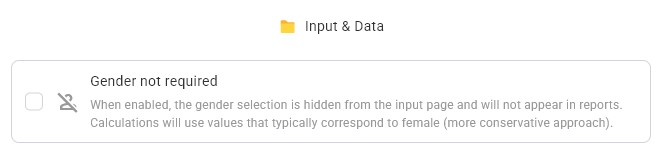
The privacy toggle decides whether gender is collected and stored at all. The KIM-LHC Gender Not Required option decides whether a collected value is used in the calculation. These are independent — you can hide gender from exports while still using it in the KIM-LHC calculation, or exclude it from both.
4 Fields stored for future use
Gender, body height, age, and weight are not printed in reports or exports and are not used in any calculation — with the single exception of gender in KIM-LHC, covered above. They are stored anonymously alongside the project.
How each one is captured differs. Use body height derives the value automatically from the motion capture data, so there is no field to fill in. Use age and Use weight each add an optional field to the input page, in years and kilograms respectively. Use gender adds the gender selector. All four toggles work the same way across NIOSH, KIM-LHC and RULA.
Why they are collected now
These fields are included in preparation for a planned dashboarding capability. At a future stage, it is intended to support correlation insights between subject-dependent characteristics — such as age range or body height — and measured risk levels across a project library. This kind of aggregate, anonymised view could help organisations identify patterns across their assessment data over time.
That dashboarding functionality is not yet released. For now, gender, body height, age, and weight have no active end-user function in reporting or export. The fields are already included in the data model precisely so that projects saved today will be ready to use when dashboarding becomes available — no retroactive data entry will be required.
Gender, body height, age, and weight are stored anonymously. They do not appear in exported PDF or Excel reports, and they are not associated with operator or evaluator name in any output.
Toggling these fields off
If you prefer not to collect these at all, you can disable them in privacy settings. The corresponding fields disappear from the input page — or, for body height, stop being derived — and nothing is stored with the project. This has no effect on current reporting or exports since these fields play no role in them today.
Privacy settings give you precise control over what appears in outputs without compromising the analysis. For details on how subject data is saved and managed as part of a project, see Projects Database.